
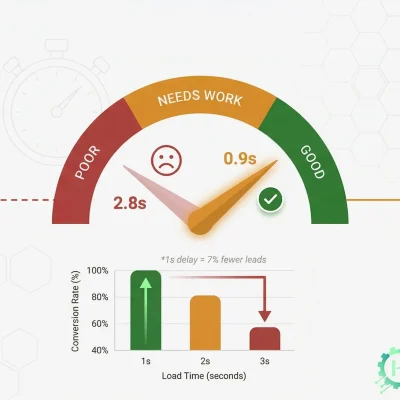


A slow WordPress site costs you rankings, visitors, and sales. Google uses page speed as a direct ranking factor. Research shows even a one-second delay can reduce conversions by 7%.
The good news: WordPress speed problems are almost always fixable. Here are 10 techniques that actually work.
1. Start With Quality Hosting
No optimization will fix a slow server. Cheap shared hosting is the silent killer of WordPress performance. In 2026, managed WordPress hosts like Kinsta, WP Engine, or Cloudways use LiteSpeed servers and infrastructure specifically tuned for WordPress.
Target a Time to First Byte (TTFB) under 200ms. If yours is above 600ms, your host is the problem — not your plugins.
2. Use a Lightweight Theme
Heavy themes like Avada or Divi load massive CSS and JavaScript files on every page — most of which you are not even using. Switch to lightweight themes like Kadence, GeneratePress, or Astra. They are lean by design and consistently score well on PageSpeed out of the box.
3. Install a Caching Plugin
Caching stores pre-built static versions of your pages so WordPress doesn’t rebuild them from scratch on every visit. This alone can cut your load time significantly.
Top picks: WP Rocket (premium, easiest to set up), LiteSpeed Cache (free, best for LiteSpeed servers), W3 Total Cache (free, more technical).
4. Optimize Every Image
Images are responsible for 60–80% of a page’s total file size on most WordPress sites. Fix this by converting images to WebP format, compressing before uploading, and enabling lazy loading so off-screen images only load when the user scrolls to them.
Plugins like ShortPixel or Imagify handle this automatically — even retroactively for your existing media library.
5. Minify CSS and JavaScript
Minification strips unnecessary whitespace and comments from code files, reducing their size without breaking anything. Most caching plugins handle this automatically. Enable minify CSS, minify JS, and defer non-critical JavaScript loading.
Always test your site after enabling these — aggressive settings can occasionally break certain plugins.
6. Use a CDN
A CDN (Content Delivery Network) stores your static files on servers worldwide. When someone visits your site from a different country, those files load from the nearest server instead of traveling across the globe.
Cloudflare’s free tier is an excellent starting point. It also adds security and DDoS protection at no extra cost.
7. Upgrade to PHP 8.2+
PHP is the language that powers WordPress on your server. PHP 8.2 is dramatically faster than PHP 7.4, which still runs on a surprising number of WordPress sites today. Check your version in your hosting dashboard — upgrading is usually a single click.
Run the PHP Compatibility Checker plugin first to confirm your theme and plugins are compatible.
8. Clean Your Database Regularly
Over time WordPress collects clutter — thousands of post revisions, expired transients, spam comments, and orphaned metadata. This slows down database queries and therefore slows down every page load.
Use WP-Optimize to clean your database and schedule automatic maintenance weekly or monthly.
9. Audit and Reduce Plugins
Every active plugin adds PHP execution and database queries to your site. The problem is not the number of plugins — it is poorly coded ones running unnecessarily on every single page.
Use Query Monitor (free) to identify which plugins are generating the most queries or slowest execution times. Remove anything you are not actively using.
10. Fix Your Core Web Vitals
Google measures three specific metrics that directly affect your rankings:
LCP (Largest Contentful Paint) — how fast your main content appears. Target: under 2.5 seconds. Fix by preloading your hero image and using fast hosting.
CLS (Cumulative Layout Shift) — how stable your layout is during loading. Target: under 0.1. Fix by always defining image dimensions in your HTML.
INP (Interaction to Next Paint) — how fast the page responds to clicks. Target: under 200ms. Fix by deferring heavy JavaScript.
Check your scores per URL inside Google Search Console.
Where to Start If You’re Overwhelmed
Don’t try to do everything at once. Start here:
- Optimize your images
- Install a caching plugin
- Set up Cloudflare CDN
- Upgrade PHP to 8.2+
- Switch to a lightweight theme
These five changes alone will produce a dramatic improvement on most WordPress sites before touching anything else.